


Download my free budget binder spreadsheet and take control of your finances. Get the data you need to make informed decisions and start budgeting today.
A Money Smart Budget Begins With You
If you’ve been waiting for my free budget binder spreadsheet for the past two years, the time has come for you to download it for free.
Before you use the free budget binder spreadsheet, ensure you understand how to use Excel.
Second, whether you use the Excel spreadsheet or any other free printable budget, read my simple 10-Step Mini Budgeting Series.
Often, I talk to readers looking for budget help but don’t use a proper budget, which can be frustrating.
You don’t need a budget so detailed that you get lost in all the information; at least, we didn’t.
There are so many free budget spreadsheets available on the internet it’s not a one-size-fits-all system.
I don’t think there is any “perfect budget” out there, but you can customize your existing budget to fit your lifestyle.
I’ve tested online and printable budgets and the pen and paper version, so if you fail initially, don’t give up.
You can’t win the battle if you hang up the towel at the first fall.
Testing The Free Budget Binder Spreadsheet
When I asked my Facebook followers who were interested in testing the new free budget binder spreadsheet in 2012, there was a lot of interest.
The only stipulation was that they had to email me at the end of the month with their feedback on the budget.
I didn’t care if they didn’t connect with the free budget binder spreadsheet.
What I wanted to know was where they felt improvements needed to be made.
I know from many of the emails that I received that some fans were not comfortable with using an Excel spreadsheet
If that’s you, I’d suggest downloading my free CBB printable bare-bones budget, where errors could be erased or removed if used online.
Some people are better off with the budget binder, where it’s all pen and paper, and you keep it nice and tidy in a binder.
We did that for the longest time before our online Excel budget, but we still use our budget binder to store receipts and finance documents for the month.
Over the two years of designing the zero-based budget spreadsheet readers wanted me to keep it simple but to include the essentials.
I offered the budget testers a choice between a free budget binder spreadsheet without projected expenses or with projected expenses.
Considering that not everyone saves money for upcoming expenses, I was happy to read emails requesting projected expenses.
These expenses need to be accounted for because if you don’t have the cash when the bill is due, you’re stuffed.
The money has got to come from somewhere.
Where will you get the money to pay the bill?
Feedback Free Budget Binder Spreadsheet
The feedback I received from every fan who did email me at the end of their test month was both positive, and I won’t say negative because it wasn’t bad.
It was more about making changes to the budget to keep it simple or accommodate things I had not thought of when designing it.
Essentially, the budget was never intended to be a free downloadable tool until the fans started emailing me for the spreadsheet.
I had designed it for our personal use, and trust me, what it looks like today is not what it looked like in the beginning.
Jen will tell you she’s still using the earlier version because she got used to it.
What she doesn’t know is that come 2014, I’m going to move her into the new Free Budget Binder Budget spreadsheet.
Using feedback, I added new features that I felt everyone would like.
Download The Free Budget Binder Spreadsheet
I’m currently offering two versions of my free Excel budget and the reason is simple.
Firstly, read the disclaimer because what you do with it is your own business, so if you mess it up, you need to sort that out.
I have not closed off any cells, so you can make all the changes you like to the budget to reflect your lifestyle, which is what the fans wanted.
Although I would love to help every single fan with their budget, I am unable to do so, but I am always willing to answer any emails you send me, so don’t be shy.
I’m always open to feedback, but be polite, as you don’t want to hurt my feelings.
I’m a sensitive guy, you know.
This was, after all, meant to be our family budget.
Although I would love to customize it for every follower who wants to use it, I’m afraid I cannot.
I’m not selling this budget or hoping to make any money from it, so enjoy this freebie, and I hope that it works for you as much as it does for us.
Canadian Budget Binder Budget Spreadsheet

You can download the free budget spreadsheets here.
Budget One
You can use the pre-existing categories or your own if you want to change them along with the projected expenses.
There are notes left around the budget to help guide you.
This budget does not offer year-end figures.
Budget Two
Everything is pre-set, so you have to use the pre-defined categories.
However, this budget will generate year-end figures, whereas the others will not.
The only downfall might be that you must use the preset budget categories I’ve chosen.
You may break the Excel formulas and year-end figures if you change anything.
There are notes left around the budget to help guide you.
I’m always open to feedback, but be polite, as you don’t want to hurt my feelings.
Get started, and don’t procrastinate.
Test it out for a month and see how it goes.
There is never any harm in trying something new in life.
You either love it or hate it; that is a fact with anything.
How We Budget Our Monthly Expenses
I often have fans ask me how to budget money and what we do to save so much, but the reply is that it’s not about the money.
It’s about the process involved.
We don’t always save as much money as we would like every month, but most importantly, we are not going into debt because we are budgeting our money.
Budget failure only occurs when you give up on the budget, which should not happen as long as you give 100% to ensure you reach your goals.
Sometimes, fans email and ask me if living on a budget in Canada is different from living in other countries.
I’m going to say that it will probably not be.
I could use this budget to meet my needs if I still lived in the UK.
Below are links to the budgeting series I wrote while designing our free budget binder spreadsheet.
I’m not a financial planner/advisor, so I can’t tell you how you should budget, but I can show you how we budget.
Like everyone else, I’m just a regular guy; some might call me a budget nerd.
Please take the time to read through the budgeting series.
I hope you take something away from the information.
10-Step Mini Budgeting Series
- How We Designed Our Budget Step 1– Gathering All the information
- How We Designed Our Budget Step 2– Categories
- How We Designed Our Budget Step 3– Tracking Receipts
- How We Designed Our Budget Step 4- Note-taking
- How We Designed Our Budget Step 5– 5S Organization
- How We Designed Our Budget Step 6– Who Does What and When?
- How We Designed Our Budget Step 7– Balancing Our Budget
- How We Designed Our Budget Step 8– Knowing our Coupon Savings
- How We Designed Our Budget Step 9– Reading Our Bills
- How We Designed Our Budget Step 10– Projected Expenses
Monthly Budget Changes
Besides the changes to our Rogers internet in August, not much has changed regarding budget amounts this month.
At the beginning of 2014, I predicted changes in our budget just by looking back over the year and seeing what we have spent.
That is the beauty of budgeting when you can look back and make those decisions based on past performance.
I don’t think a budget will ever need dusting off in our house.
Budget Percentages Sept 2013
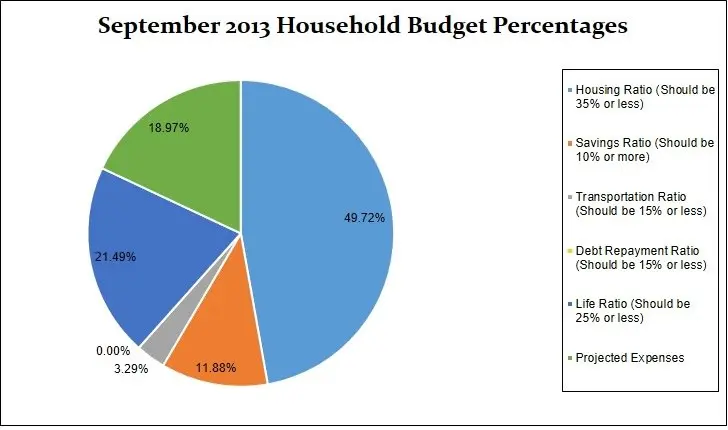
Our savings of 11.88% include savings and investments.
I’ve also added in our projected expenses this month at 18.97%, which brings the total September 2013 Household Budget percentages to 105.35%.
The figure is more than 100% due to the $363.97 overspent we had this month.
Expenses Breakdown
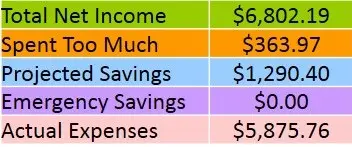
This is simply a breakdown of our expenses, which has helped us understand where all our money goes.
I appreciate that you enjoy this budget update each month.
Use our budget only as an educational tool rather than comparing your financial numbers.
Sometimes, we wish we had more money to budget with, but we understand that we only have what we earn, and if we want more, we need to earn more.
Spending less than we earn and budgeting our money has been the easiest way for us to pay down debt and save money.
- Chequing– This is the bank account where all our debt gets paid.
- Emergency Savings Account– This is a high-interest savings account.
- Regular Savings Account– This savings account holds our projected expenses.
- Monthly Budget Total: $4459.03
- Monthly Net Income Total: $6802.19
- Total Coupons Used: includes every discount attained during the month = $5.75
- Projected Expenses: These are expenses we know we will pay for throughout the year = $1290.40
- Total Expenses Paid Out: $5875.76
- Total Expenses Paid Out Calculated is $6802.19 (total net monthly income) + $363.97 (total monthly savings/overspend)–Projected expenses $1290.40= $5875.76
- Actual Cash Savings Going Into Emergency Savings: $0.00 Calculated is $6802.19 (total monthly net income) – $5875.76 (actual expenses paid out for the month)–$1290.40(projected expenses)= –$363.97
Results
Expenses were high this month due to home maintenance and purchasing a home computer system, laptop, printer, and surround speakers.
We also purchased a range hood for $1400 plus tax but only put a $400 deposit down and in October the remainder will be reflected in our budget.
I also finished the landscaping with the purchase of new sod.
Understanding Projected Expenses
What are Projected Expenses (PE)? – We project expenses throughout the year so we have the money saved.
We review our projected expenses at the beginning of the year to set up our yearly budget and adjust as we go along if a new projected expense arises and needs to be added to the budget.
Sometimes we remove a projected expense as well, so reviewing your expenses is important.
This has happened on many occasions, but it’s bound to happen as we can’t predict everything we will have to pay for over the year.
The important part for us is that we are saving for these expenses and no longer have to stress about taking money from our savings to pay for them.
Read Step 10 in my budgeting series to learn more about projected expenses.
When we spend the money in a projected expense category, we move that money to our chequing account to pay for that incoming expense.
We pay money into the projected expenses account continually throughout the year, even when bills come due as it’s revolving.
As one bill gets paid, the money continues to come in from the other categories all year.
So, the $1290.44 gets paid into the projected expense account every month, no matter what.
It seems easier to track our money this way, but you can do what works best for you.
Budget September 2013
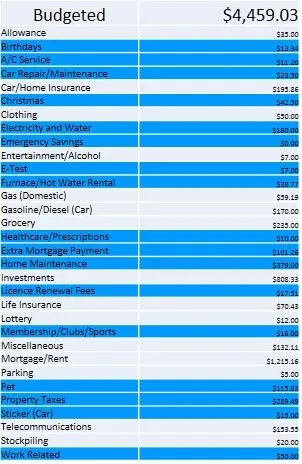
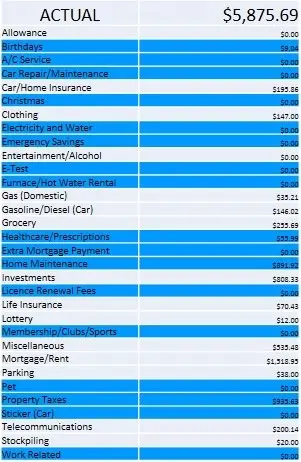
If it is highlighted in blue, it means it’s a projected expense.
Actual Budget September 2013
Goals September 2013
- Plant the cranberry tree – PASS
- Roll the back lawn- PASS
- Put in the new sod out front- PASS
- Read more in my personal finance book- BIG FAIL
- Sort out the mortgage- In Progress
- Move my money to Canada- In Progress
- Reach 6250 Facebook Fans- FAIL
- Reach 1950 Twitter Followers- PASS
- Reach 1210 Blog Followers- PASS
- Install garden spotlights- FAIL
- Fix the deck lights- FAIL
- Start to tear main bathroom for renovations- FAIL
- Take a 3 day holiday with the love of my life x- FAIL
October 2013 Goals To Consider
- Get organized with blog activities
- Learn more about affiliate marketing and blog advertising
- Do more freelance work (HIRE ME)
- Read more in my personal finance book
- Sort out and pay mortgage in full
- Move my money to Canada (watching exchange rate)
- Reach 6250 Facebook Fans
- Reach 2000 Twitter Followers
- Reach 1230 Blog Followers
- Install garden spotlights
- Fix the deck lights
- Start to tear main bathroom for renovations
- Train for 10k run and get my time down
- Take a 3 day holiday with the love of my life x
Monthly Budget Updates
In case you missed our budget updates from the start of the year, I will list them here monthly.
Check back at the beginning of October for our new budget update and maybe some good news.
Thanks for reading,
Mr. CBB
Hello there!
This is such a very helpful post. Thank you very much for sharing this. I love that Canadian Budget Binder Budget Spreadsheet. I think my mom also needs this.
-Abby
I’ve never used excel so I have downloaded both budgets and will print them off when I can get at the printer. look both over and see what I can do with them. I might need a kid to help me but I want to load it onto a thumb drive so I won’t need to haul out the laptop. The older boy uses it during the day and I get it after supper. Plus I use the ipad. I know it’s likely stupid easy but I do know my limits with the computer.
Things are looking good with your numbers. Hospital parking is expensive, we know that here from experience!! We all have things on the to-do list that do not get done as quickly as we would like but it’s life.
Hospital parking is so bad I hate thinking about it. I might have to write a post about it.. I took photos of the parking box while I was at the hospital. We’ve spent lots of money the past couple of months but it was necessary. There comes a point where things just start breaking down and wearing out and they need to be replaced.
I hear you with the parking fees. Stratford is flat rate, $5.00. If I’m going to be there a while it’s one thing but if I’m just popping in for a visit I park on the street around the corners . If I’m going to emergency I pay. London tops out for the day at $12.00. Toronto is $20.00. Amazingly enough in town here is still free parking!!!! Yea!!! The only thing about going to London is we are just far enough away we can claim gas and parking on our income tax. I’m not sure just how far you had to go to take the Mrs to her appointments but I think the distance is 40 km. To claim. Plus you do need the receipt for the parking. Here to Victoria Hospital return is 96 km. Handy info to know if you are like us and making a lot of trips to and from. The hospital gave us a sheet to keep track and we are on our second sheet!! I have a paper clip on it to keep those parking receipts.
Our doctor is in town and the other is 30 minutes away so not too far and not too often. Is there a certain amount you need to spend first before you can claim the medical expenses or under what category do you claim these expenses in your income tax? Last year was the first year I did my own taxes.
Yes there is a minimum Mr CBB and it’s based on a percentage of your income. For hubby and I it translates to about $1,800 before we can claim. I keep track of all the medical expenses whether or not they are actually claimed. The amount we have for prescriptions that the extended doesn’t pay, the portion of medical & expenses that is not covered by our extended – usually 20% but this year we’ll have my new crown and the mouth guard replacement, the eye glasses and testing not covered by our extended. I have glasses for reading and another pair for the computer but our extended only pays for 1 pair per person every two years so at least one pair of my glasses are not covered. When I was hurt in an MVA hears back… crutches, cane, walker and what not were all deductible. Grab a CRA guide… you may be able to claim some of this years hefty expenses. BUT, I will say, if historically you haven’t deducted medical expenses….suddenly having a hefty deduction is likely to trigger an audit as far back as 7 years. Just be prepared for that possibility.
I have my own spreadsheet in Google docs, but I’m going to try yours because I bet it’s better. Thanks for sharing.
Hey Kim!! Yes, check it out you might like the budget especially since you are a Grocery Game Challenge poster!!
Good luck on your October goals! It’s a great time of year to run!
It is an awesome time to run. Although I don’t get out to run as much as I’d like I do have a treadmill here so I run indoors as well. I’m so busy and multi-task even though I hate to do that because I’m rubbish at it.
Wow – what a thorough post. I use Excel to budget and love it. Being able to design something to match your own needs (and make it aesthetically pleasing for yourself) is a great benefit.
Good luck with your October goals.
Thanks mate… I hope we can make the October goals as well but I do my best when it comes to my part. The budget for us has evolved over time but it’s still kept quite simple when it comes to detail. I hope you get a chance to check it out. Cheers
I agree with moneystepper…this is a thorough post!
I don’t use a spreadsheet for our budget but it has made a huge difference in our lives. Budgeting brings me face-to-face with all of our spending decisions. No more denial.
We use mint for our budgeting purposes and it works well do us since it’s so automated and easy to stay synced with one another and working together even when we happen to be in separate time zones. =)
I’ve never checked out MINT but certainly it’s an option. There are so many budgets out there I think finding what works is most important. Cheers mate
Great information! Im with you on affiliate marketing. That’s one area that I’ve yet to figure out how people are doing so well with that. I’m hoping to learn a lot about that at Fincon!
I have been using your spread sheet for a while it is awesome! I don’t know what I would have done without your site and as we regroup to knock down more of our debt this next year I will be utilizing your website heavily. A wealth of knowledge from a good friend who could ask for more?
Karen,
Thank you so much for the feedback. You know it’s wonderful when I hear how others are making improvements in their budget and learning about their finances. Keep up the awesome work mate. CBB
Is there a way for the line items in the liabilities and budgeted columns to automatically transfer to each month? I have many of the same items for each month and this would be a fantastic help. Thanks!
Hi Mandi,
I’m glad you’re using the CBB Budget. Yes, as long as you know how to work excel you can create a formula to do this. I left one budget open for this reason so anyone who wanted to customize their budget could do so. I know I can’t help you but I hope you can do it yourself or find an friend who works well with excel. 🙂 Happy Budgeting. Any other questions you can also email me. 🙂 Have a great week.