


Estimated reading time: 10 minutes
When starting with budgeting, I often find the best way to track expenses is by manually using a spending tracker.
Not everyone is comfortable using a spending spreadsheet, which I offer my readers for free in Excel.
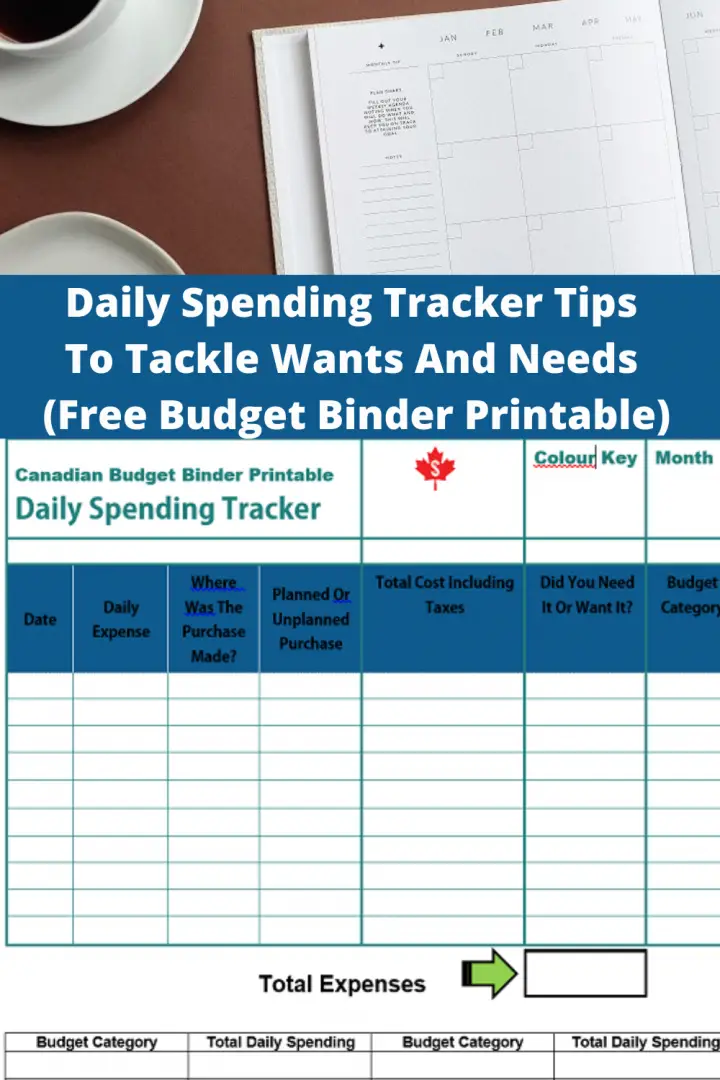
At the end of this blog post, you can access the Free Daily Spending Tracker printable and see where our money went in July.
Mindful Spending With A Daily Spending Tracker
The idea behind my CBB Excel spending tracker is similar to that of the printable Spending Tracker.
Both budget tracking systems act as visual motivation as they add daily expenses by category.
The only difference is that one is manual, and the other uses formulas created in an Excel spreadsheet.
When I created this budget binder printable, Mrs. CBB said she’d use it if I weren’t here to help her.
See, she does need me. Haha!
The reason is that she’s uncomfortable using Excel, and the printable budget binder is more up her alley.
She’s all for using a basic budget printable or the Excel spreadsheet budget without formulas that she’d likely mess up.
How The Daily Spending Tracker Works
The printable Spending Tracker is quite simple to use; however, the tricky part is remembering to ask for receipts.
Without the receipts or a way to find out where you spent money throughout the day, you have no tracking system.
The printable version allows you to highlight each expense on the Spending Tracker so you have visual motivation.
You would use colored highlighters to create a color legend for wants and needs.
There’s no method to the color madness of using colors and tracking what you want to track.
Just keep it simple, and if there are budget categories you want to pay close attention to, use color.
I keep a green, yellow, orange, pink, blue, and purple highlighter set in my office as they come in handy with budgeting.
Especially if you use budget printable sheets, you may have color codes based on personal reference needs.
Motivation and Mindful Spending Awareness
Highlighting expenses on the Spending Tracker allows the user to visually see areas where they are overdoing any unplanned monthly spending.
That doesn’t necessarily mean you are doing a bad job at budgeting. It means you need to be mindful of where the money is going.
We often have unplanned expenses that we can’t forecast, which fall under the miscellaneous or unplanned category.
These aren’t necessarily called emergency expenses either; otherwise, the money would come from that category.
Emotional spending is also at its highest, especially during the COVID-19 pandemic, when consumers are prone to online shopping.
It’s so easy to open an app and start online shopping; next thing you know, you’ve added an expense to your budget.
When we become bored and window shop, it can be a dangerous route to added debt or using cash reserves.
This could also mean overspending on a credit card you can’t pay at the end of the month.
Using The Spending Tracker With Budget Systems
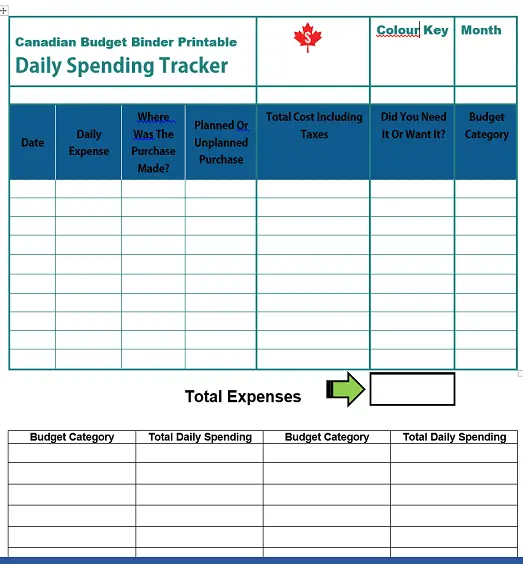
This Spending Tracker may be ideal for those who use monthly budgeting jars or a cash envelope system.
Print one or two copies of the Spending Tracker printable and keep it with your budgeting system.
If you’re the type of person who needs a reminder to use the Spending Tracker, perhaps hang it somewhere at eye level.
For example, put a magnet on the Spending Tracker if you are in and out of the refrigerator during the day.
Keep highlighters next to your folder of receipts you need to track if the kitchen is where you will complete the task.
If you use a home office or dedicated space where you work on your budget, plan a time to complete the task.
For example, if you are home in the evenings, take 10-15 minutes before bed to fill in your Spending Tracker.
When working the night shift, when you get home and are wired, use that time and jot down your daily expenses.
Getting into a routine with our budget binder to fill out the printable budget sheets helps us tremendously.
If you have a smartphone, you can always set a Spending Tracker alert to motivate you to get to the tracking area.
In today’s busy world, whether you have kids or not, setting calendar alerts is great as long as you pick the right alert tone.
Picking something you find happy or laughable can significantly increase the likelihood of completing the task rather than putting it off.
If you find you continually coming up with excuses or failing to fill in your Spending Tracker, you may need a better alert system.
Hands-On Visual Motivation
The great thing about a printable monthly budget binder is the visual aspect that differs from a mobile budget app.
Yes, you get a visual with a mobile app, but using a pencil and eraser is comparable to getting your hand’s dirty work ethic rather than utilizing the convenience of an app.
Consider whether the in-your-face approach is right for you or the app that only gets used if you open it up.
I’m terrible with using a smartphone even though I now own one and probably won’t ever use anything but our Excel spreadsheet and printables.
Building Finance Experience
If you use the daily Spending Tracker, you’ll either find that it motivates you to spend less or that you’re ready to move on to my free Excel budget spreadsheet.
My Free Excel budget spreadsheet and Spending Tracker printables are on the Free Budget Printables Page.
Discussion: Would you benefit from tracking your daily expenses and color-coding your wants vs. needs?
Leave me your comments below and feedback if you use the free printable.
Home Budget Income Report July 2020
Where did the money go?
Hi CBB readers,
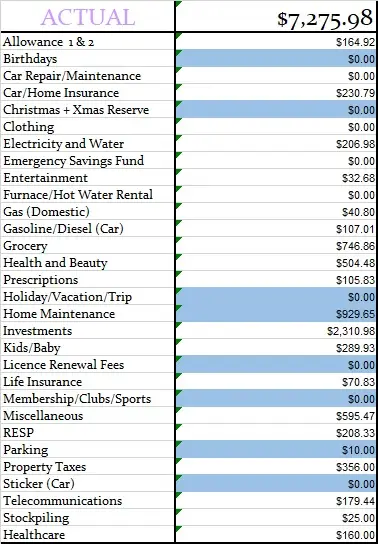
We bought a roll of membrane that I needed to finish off the insulation in the basement and wood from Home Depot.
The membrane alone cost us $300, and I had to jump through hoops to find it, as none of the stores in our area had it.
Our grocery budget is over for July as we did some things outside the ordinary.
When shopping at Costco, we doubled up on some items on our list because they were on sale.
Also, Mrs. CBB found some keto products on Amazon for a lightning deal of over 50% off.
She keeps this Organika Bone Broth on hand when we don’t have keto bone broth prepared in the freezer.
She also takes it with us when we travel out of town as it’s easier to transport and fix her bone broth.
Other categories we spent over budget were:
- My Allowance went over budget because I stocked up on alcohol for our cabinet and bought extra beer. I needed a bottle of vodka to experiment with making soft Keto ice cream. The beer was a want that went over budget.
- Prescriptions were higher this month because of Mrs. CBB needing extra medications for a health problem she’s dealing with. She also picked up migraine medication, and the price tag was shocking. Thankfully, my benefits covered 85% of the $300 for 9 pills.
- The kids category went way over because we bought our little guy a Jeep to ride around in as well for Switch video games.
- Health and Beauty skyrocketed as we did a 20x the points shop to stock up on Mrs. CBB’s skincare products that were on sale, too.
- She also purchased SkinCeuticals Sunscreen from her dermatologist. We also bought new electric toothbrushes from Costco that cost us $150 – $30 rebate.
- Purchasing a new Swordfish UK Air Treatment System that kills molds, viruses, and fungus in the indoor air was not in the budget. We have had one for years, and it had done its time, which I was not expecting this year. The bulbs alone are just over $50 with taxes.
Home Budget Percentages
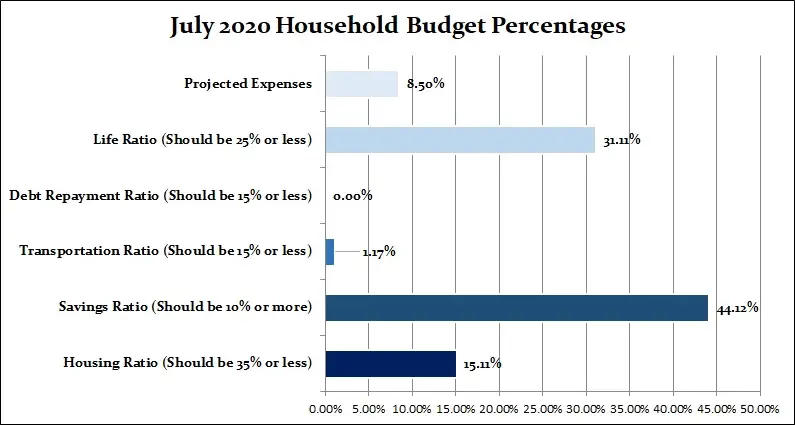
Our savings of 44.32 % include investments and any savings for this month based on the net income of $7899.29.
We save money in our projected expenses for things that must be paid for in the coming months.
All categories account for 100% of our income, which shows that we accounted for all of the income in July 2020.
This type of budget is a zero-based budget where all the money has a home.
Monthly Home Budget Expenses
Below is a breakdown of our expenses, which helps us understand where all our money goes.
- Chequing– This is the bank account where all our debt gets paid. We use Simplii Financial.
- Emergency Savings Account– This is a high-interest savings account.
- Regular Savings Account– This savings account holds our projected expenses.
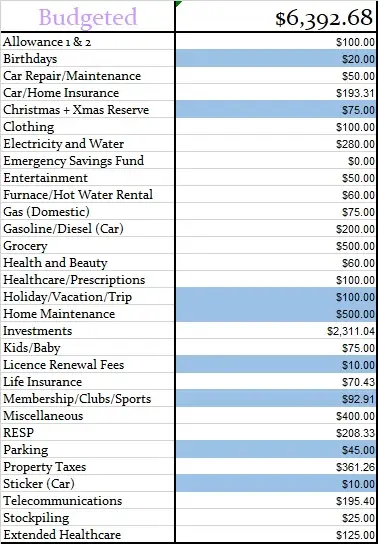
- Monthly Budgeted Total: $6,392.68
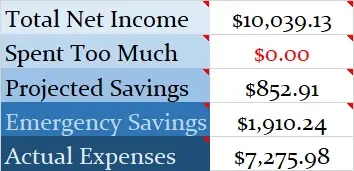
- Monthly Net Income Total: $10,039.13
- (Check out our Ultimate Grocery Guide to see where our grocery money goes)
- Projected Expenses: These are expenses we know we will pay for throughout the year = $852.91
- Total Expenses Paid Out: $7275.98
- Total Expenses Paid Out: Calculated is $10,039.13 (total net monthly income) – $852.91 (projected expenses) –$1910.24 (savings to emergency fund) = $7275.98
- Actual Cash Savings going into Emergency Savings: Calculated is $10,039.13 (total monthly net income) – $7275.98 (actual expenses paid out for the month) – $852.91 (projected expenses) = –$1910.24
Monthly Budget and Actual Budget
Below, you will see two tables; one is our monthly budget, and the other is our actual budget.
This budget represents 2 adults and a pre-schooler, plus retirement investments.
Budget color chart: If highlighted in blue, it is a projected expense.
Since May 2014, we’ve been mortgage-free, so much of our money will be directed at savings, investments, and renovations.
I appreciate that you enjoy this budget update each month, but I do hope you view this as an educational tool rather than comparing your financial numbers, as our situations are all unique.
Spending less than we earn and budgeting has been the easiest way for us to pay down debt and save money.
Monthly Home Budget Actual Expenses
CBB Budget Updates Month By Month
In case you missed our budget updates from 2012 to the present, I’ve compiled them all on one handy page: monthly budgets.