


Estimated reading time: 16 minutes
Looking for the best budgeting app for Canada? Check out Lunch Money, a web app that syncs transactions from credit cards and bank accounts automatically.
Lunch Money is a personal finance app built by Canadians, for Canadians. It connects seamlessly to top banks in Canada to track your spending, savings, and investments across multiple currencies. That way, you can stay organized and reach your financial goals more easily.
Suppose you feel ready to graduate from the printable budget binders and want software that automatically syncs your bank transactions.
In that case, you’ll probably want something a bit more robust than a spreadsheet to handle your various bank connections.
With the recent shutdown of Mint.com, I’ve been looking for new alternatives to keep track of my personal finances, especially for Canada-based financial institutions.
My current pick is a web app called Lunch Money, started by a Canadian, and is perfect for those who live in Canada and may also do a lot of cross-border transactions, such as visiting or buying from the US and Europe.
Replacing Mint.com
Mint was one of the first online budgeting and personal finance tools for Canadian users, thanks to its ability to automatically sync transactions from credit cards and bank accounts.
By combining all your account data into a single screen, the software automatically assigns categories to each transaction, allowing you to create a monthly budget, analyze your spending with reports, track your net worth, and set financial goals.
At the time, the features offered were quite an improvement, from entering transactions by hand to other solutions like Microsoft Money (where most transactions were left uncategorized), budgeting with spreadsheets, or using a physical envelope budgeting system.
Mint was a free tool that made money by selling user data to financial services companies to place targeted ads on its site, such as solicitations to sign up for credit cards or loans.
After raising over $31 million from venture capitalists, Mint was acquired by Intuit, which primarily used Mint to funnel users to Credit Karma, another acquisition, as explained in this video.
In November 2023, Intuit announced that Mint would shut down, following rumors that the product was not making enough money to justify its upkeep, despite over 4 million people relying on it for years for personal finance management.
Lunch Money’s Notable Features

Pricing
Unlike Mint.com, Lunch Money has never taken investor money.
They can already sustain their business through customer support by charging a small fee.
Like other personal finance apps, Lunch Money has a subscription fee.
Instead of selling your data or plastering the site with affiliate banners for credit card deals, Lunch Money charges between $40 and $150 USD per year.
I say “between” because you can choose how much you value the product.
If money is tight, go for the $60/year option, totaling $5/month.
You can also choose to pay $10/month.
Their pricing page has a slider that shows the perks you get for choosing a higher-tier plan.
Canadian Bank Support And More
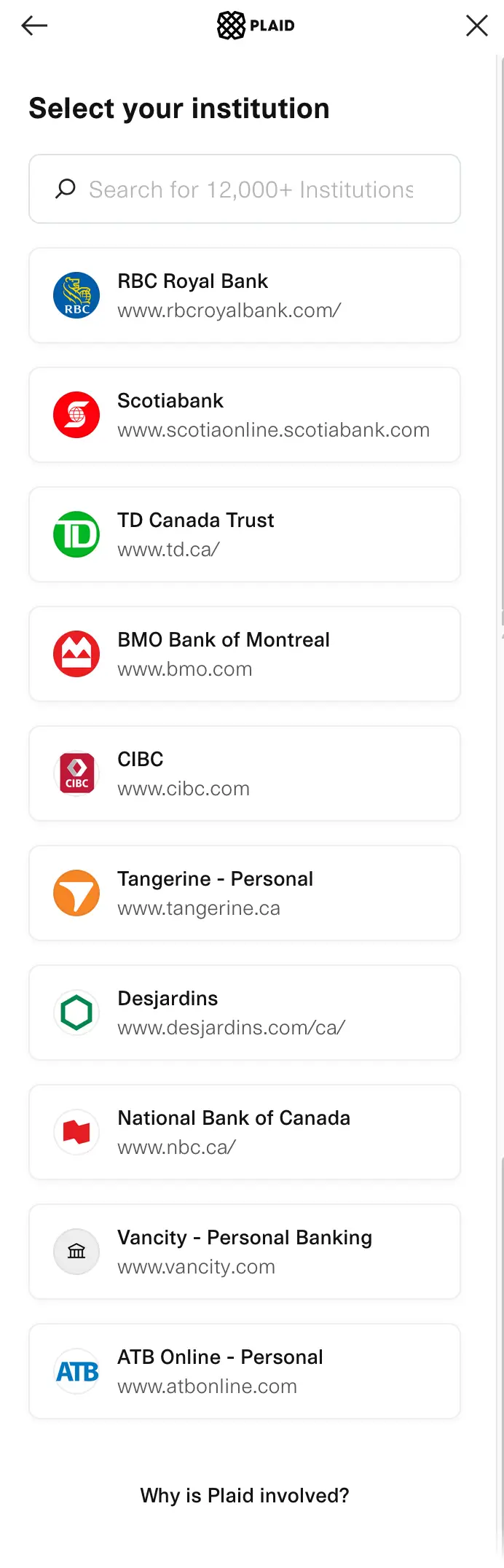
Lunch Money connects to your banks and financial institutions through Plaid.
Signing up for the free trial (get a 60-day trial through our link instead of the usual 30-day trial) is the best way to see if your banks are supported.
With support from over 12,000 financial institutions worldwide, it’s not easy to list them all.
Below is a screenshot of the more popular banks, including RBC, Scotiabank, TD, BMO, CIBC, and Tangerine.
You can also sync with Wealthsimple if you join their beta program to test out early features.
You can join Lunch Money’s beta program by selecting a setting in the community tab in your settings panel.
Multi-Currency Support
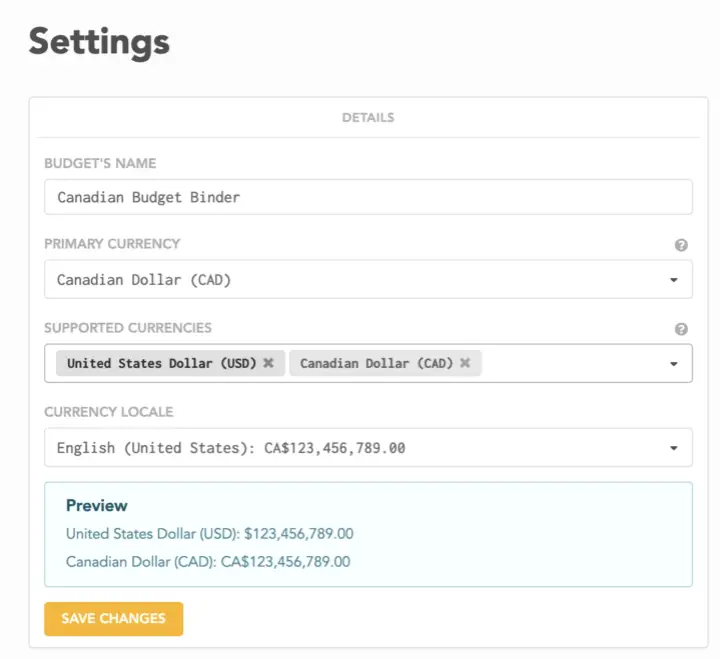
One of the main reasons I picked Lunch Money as the best personal finance app for Canadians is the multi-currency support.
In the settings, you can choose your default currency and a list of supported currencies.
Lunch Money will automatically convert amounts for you to your default currency.
It also cleverly uses historical exchange rates based on the transaction date to reflect the actual exchange rate in your expenses.
The multiple-currency support lets you easily track spending in Canadian dollars even when you make international transactions while traveling.
Clean Interface
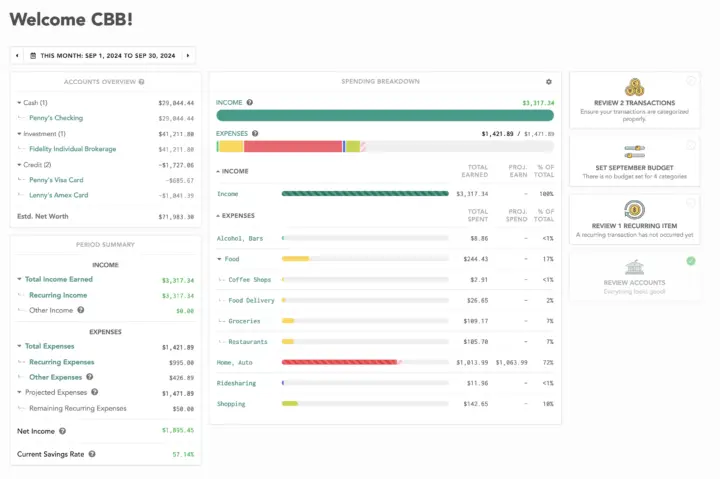
Lunch Money’s clean user interface and dashboard allow you to be mindful of your spending without too much effort.
Looking at the central column, the first and second bar charts show your monthly income vs. expenses.
You can quickly see if your expenses are starting to overtake the income line.
Below that section, the dashboard shows bar charts showing how much you are expected to spend in each category.
This projection is based on the software recognizing your previous recurring expenses (which are detected automatically).
As the month progresses, you can quickly recognize anomalies and make corrections to rein in your spending.
You can track your cash, investment, and credit card accounts in the left column.
They all sync automatically with Plaid.
Any Canadian financial institution that’s not supported can still be tracked manually.
You can upload a PDF statement or CSV file, and the app will import your transactions.
The period summary panel below the expenses can be helpful if you have a savings goal.
For example, if you want to save 20% of your take-home income, you can look at that section each month to ensure you are on track.
The right column includes a button to review and categorize transactions.
A button also takes you to your monthly budget and shows your recurring items so you can edit them if necessary.
The “review accounts” button takes you to any bank sync connections that might have disconnected.
Automatic Budget Categories and Rules
One of Mint’s core strengths was its automatic categorization feature.
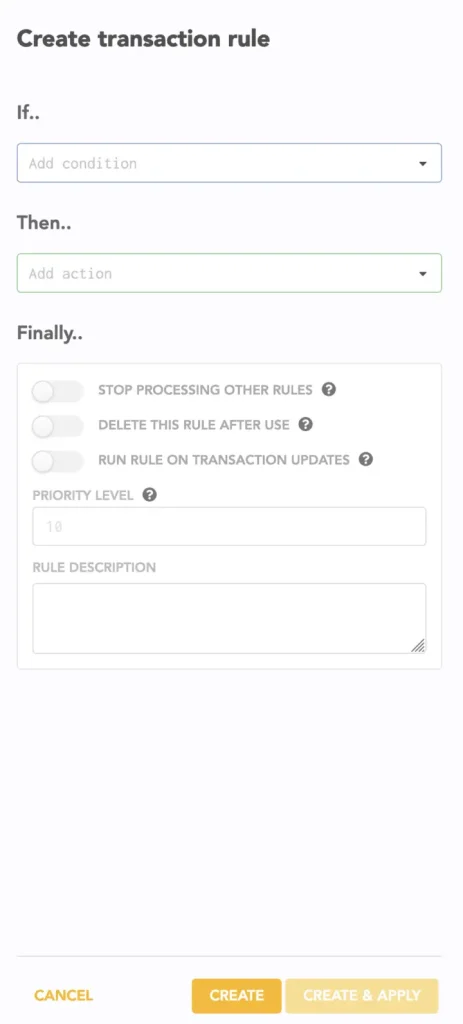
Lunch Money supercharges this with a rules engine.
You can do things like automatically split transactions or be notified by email if a particular account has a transaction.
Net Worth Tracker
The net worth tracker that Lunch Money provides gives a view of your net worth.
It gives you a good picture of your entire financial portfolio.
You can even track car value depreciation and house worth using extensions written by other Lunch Money users.
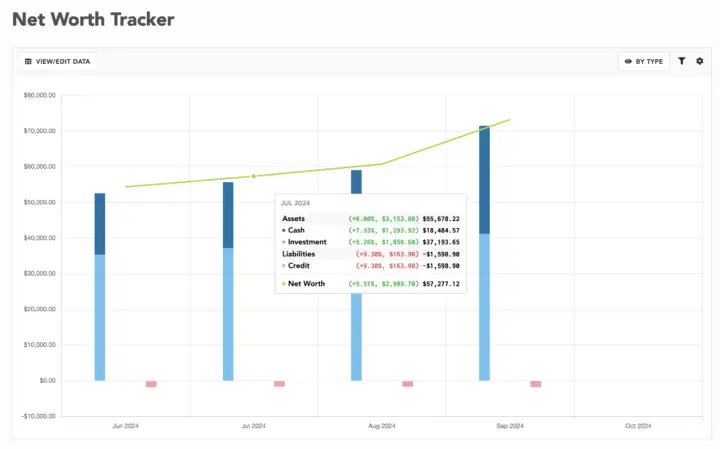
The net worth tracker lets you watch your financial portfolio and cash assets charted monthly.
You can view how your assets are growing or switch views to see which accounts are growing the fastest.
Related: How to track your net worth.
Beneficial Community
Suppose you have a question about accomplishing a specific task, such as using Lunch Money for shared payments as a couple.
In that case, chances are someone from the Lunch Money team or a fellow user will be able to answer it in the Lunch Money Discord community.
Their email support is quite responsive, too.
You can provide input on their roadmap if you have any feature requests.
Mobile Apps
Lunch Money is primarily web-based, but it also has Android and iOS mobile apps developed by Lunch Money users through the public developer API.
I prefer doing my financial work on a desktop, but if you prefer having a mobile option, there are:
- Android: Lunch Money Companion
- iOS: Brunch Money
- iOS: Lunch Money Pal
Some other apps people mention
YNAB
- It’s a large group of feverish fans, but it can be a difficult app to learn. Some people need to hire a financial coach to teach them YNAB to get started.
- It can be a good app if you like the zero-based budgeting style, where every dollar goes to a specific category. Requires a lot of attention. People recommend reconciling daily. It can be good for certain people, but it’s not for everyone.
- No multi-currency support. You will have to employ the hack of having a second budget for a different currency. It could get annoying if you travel a lot.
- Pricing $9.08 USD/month if paid yearly
Monarch
- Supports only USD! They claim to be available in Canada, but transactions are only displayed in US dollars.
- There are no stand-out features, and they seem to be experiencing some growing pains. Look at their subreddit to get a pulse on any major issues.
- Pricing: $8.33 USD/month if paying for a year upfront.
Conclusion: The Best Budgeting App For Canadians
Lunch Money is one of those apps that works with how people think.
You don’t have to fight it or deal with a steep learning curve.
There is excellent data flexibility with their ability to import or export all your data.
You can still hop to another piece of software if something better comes along.
Your data won’t be sold because it isn’t the product.
Bank-level security is built in and includes two-factor authentication.
Great value for a simple but powerful money-tracking system.
Sign up for the free 60-day trial to Lunch Money.
Thanks for reading,
Mr. CBB
Canadian Budget Binder may get a small referral bonus for Lunch Money if you use my affiliate link. There is no cost to the user, but you support CBB to help keep everything Free.