



A grocery price book can transform your shopping habits. Discover effective strategies to save money on groceries.
For many families, groceries make up a large portion of their monthly spending, and with a simple grocery price book, you can go from spending too much to saving tonnes of money.
If you want to spend less every month on food expenses, you can save a considerable amount of money on groceries by doing homework.
In this article, I’ll walk you through how to set up a grocery price book for yourself so you can save money on your grocery bill.
Make A Grocery Price Book To Find The Best Food Prices
Knowing your prices is one of the best strategies to save money on groceries, but so is understanding who has the best prices.
It also helps to evaluate the sale flyers to know if a sale is the best price in town or if they are trying to lure you into the store.
Prices constantly change on food, so you must watch prices and adjust them in your grocery price book often.
If you track the prices, you’ll know when to stock up, how much to buy, and if you can apply coupons or other savings to make an even better deal.
The simplest way to understand your local food prices is to create a grocery price book. I’ve done one for you today, and it’s FREE to download.
What is a grocery price book?

A grocery price book, also known as a price comparison chart, is a sheet that tracks the prices of the items you purchase most frequently.
It takes some time to set up, but you’ll earn back your time quickly.
To see this in action, take the example of my favorite brand of bouillon, Better Than Bouillon Chicken Bouillon.
Here are the prices at my local grocery stores:
- Wegman’s: Regular price of $3.99
- Giant: The sale price of $3.99, the Regular price of $4.49
- Walmart: Regular price of $3.58
While browsing Giant, I saw that the chicken bouillon was on sale and thought I should stock up! It’s a good thing I didn’t.
Upon examining the prices listed, it becomes apparent that the sale price isn’t a sale at all.
If a sale is less than the everyday price at Walmart, I’ll stock up then.
What’s The Best Format For A Grocery Price Book?
A spreadsheet is an excellent tool for organizing your grocery price book.
While spreadsheet programs like Excel or Open Office will work, my favorite is a Google Drive spreadsheet.
I can access the spreadsheet from my smartphone to check prices at the grocery store.
Using a paper notebook to track prices is an option if you prefer a traditional approach.
Create a page for each item you use frequently, and then add the necessary columns across the page.
You can create a binder with printables like these at Organized Home (the blog owner has retired) or free printable lists at Canadian Budget Binder.
What Do You Track In Your Grocery Price Book?
You can track a range of things in your grocery price book.
It’s a balance of collecting enough information to be helpful while making it simple enough to maintain.
I track the store, product category, item, brand, size, price, whether it’s a sale or the standard price, and the date of purchase. Then I calculate the unit price of each item.
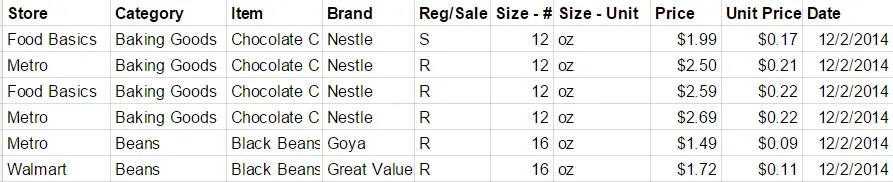
Ultimately, you’ll want to compare the item’s unit price to the lowest price.
That’s the price of the item divided by the size.
I’ll use the price of walnuts as an example:

It’s now possible to compare the 48-oz bag to the bulk walnuts in the bin at the same store.
The price is 20% less.
That’s a considerable savings.
Tracking sales by date is also helpful.
By tracking prices over time, you can identify the sales cycle length and determine when sales occur.
If you have a good guess of how much you use, you can buy enough when it’s on sale to carry you through to the next big deal.
Building Your Grocery Price Book
To create my initial list, I reviewed my receipts to identify items I had purchased multiple times over the last month.
You can start with a smaller amount — say ten items — if that helps you get started. I’ll add more items to my list as I shop every week.
There are several ways to obtain prices, including using receipts, grocery store flyers, grocery apps, and visiting the store.
I wanted a quick overview, so I walked around my local stores and wrote down the prices.
If you don’t like the sound of that, it’s OK to work off your recent receipts and your local flyers.
Groceries are sold everywhere, from your local grocery store to gas stations.
I started with five grocery stores within a 10-minute drive of my house.
Over time, I’ll check smaller stores, such as international grocery stores and pharmacies.
It took about 10 hours to capture 400 prices at five different stores.
While 10 hours seems like a lot of time, I’m sure I’ll earn back the value of my time quickly.
If I buy 100 items monthly at $0.50 less each, I’ll save $50 every month!
How To Use Your Grocery Price Book
Now that you’ve built up your price comparison chart, you’ll want to use it to continue saving money.
To avoid stopping at multiple stores every week, consider visiting stores on a monthly rotation.
If you visit one to two stores every week, you can cover all the stores on your list on a regular basis.
You’ll also want to continue to check for deals.
The easiest way to do this is to browse the grocery store flyers online and add prices as needed.
Free Grocery Price Book Template
Now that you know exactly what to do to get started with your grocery price book, it’s time to begin saving!
You can save a copy of this Google Drive template to create your grocery price book.
It’s also available as a Free Excel spreadsheet-Grocery Price Book.
Happy Saving!
This post was a contribution to CBB.
Related Posts
- How to handle when your spouse spends too much money
- How going vegan affected our budget
- Are you Supermarket loyal?
- How a Small-Town Family Saves Money on Groceries
- How I put a $1700 dent in our budget with a simple error
- Men who cook: Do women find them sexy?
- Product Price Adjustments Don’t Miss The Savings
- Scanning Code of Practice In Canada (SCOP)
I do the same, and I add a note as to whether the price refers to local/in-season or imported. Also add brand names for the few items where it matters to me. This coming year I am handing over the grocery budget to my spouse and I look forward to seeing how he does with it!
Maybe some day I’ll hand over the groceries to my spouse. 🙂 That’d be nice. I’ve done most of the grocery shopping over the years as I’m good at picking out the fresh stuff and the deals.
I’m out of practice due to an old job that took way too many hours of my life, but I used to note prices beside the item on my list as I was making my way through the store. It paid off more than once when I checked my receipt and found a price discrepancy. Some stores give you the item for free if you catch an incorrect grocery scan. Writing the prices down seemed to make them stick with me better too, so I knew if something was a good price or not. I like your grocery price book because it gives the unit price – a helpful tool as the larger “economy” size is not always the most economical choice.
After doing this, I found I remembered prices better too. I’ll have to try that tip of writing prices down on my list as I go!
I always check prices and if an item is on sale I check the unit price on the shelf tag to see how it breaks down. I keep a mental list of the most common items I buy but I’m thinking I might want to make myself a paper list to use at home for making my grocery list. I’m in a small town with two stores for groceries. A lot of people fuss that the one across the street from me is expensive. I’ve run the prices at the other store as have a couple of other people I know and my closest store does come out cheaper. Mind you the stores in the nearest small city to us is even cheaper but I can’t always get there to take advantage and we must work with what we have….. A very good article with plenty to think about!!!
Unit price is the key! I’ve actually switched my default cheap store from doing this exercise.
When I started tracking our grocery budget I spent quite a bit of time creating my price book and learning my prices. I was amazed how many sales weren’t. Or at least weren’t as good as the sale price could be. Now I can spot a deal without using my price book. I also mostly shop at our discount grocery store and when I walk into a regular grocery store everything seems so expensive!
I still have more items to add, but I’m so surprised how the sales really aren’t sales! It will be nice to have them memorized so I can spot a deal like you some day. 🙂
My wife has been doing this for a while now. Especially important is the Unit Price comparison when Costco is part of your grocery shopping destinations and their sometimes larger containers.
Unit price is the key! That is — as long as you can use everything in whatever size you buy.
I usually go to the grocery every week and I also compared prices. I’m glad that my favorite mall has lower prices compared to other grocery stores.
All of the best prices are pretty scattered for me, unfortunately, so I rotate stores. That’s good that you can just go to one!
This is a great post – thanks for sharing! I just started blogging about our journey to pay off debt and we definitely need to cut our spending on groceries. A price book will be a great resource!
I hope you enjoy using it Alex.If you are interested in cutting your budget please consider joining our grocery game challenge which starts up again the first week of January 2015. Rules on how to post and save are on the blog.
Thanks – I was reading about the grocery game challenge. I’ll definitely participate in January!
I’m using your template! Thanks so much for the head start! 🙂
No problem mate we love it and still use it.
THANK YOU!!! This was extremely helpful. I wanted to start a grocery price book and have been planning to start one for a while. But I was just going to list all of the items and prices in google docs. It never crossed my mind to use a spreadsheet and it makes SO MUCH SENSE!! And the free template is amazing. I appreciate the time you spent making this.